Why I Built Fray —
And Why I'm Giving It Away
A deep dive into building an open-source offensive security toolkit with 4,025+ attack payloads, 25 WAF fingerprints, and AI-native workflows — and why every company that pays for a WAF should be testing it with real attack patterns.
TL;DR
We built Fray — an open-source offensive security toolkit with 5,500+ curated attack payloads, automatic fingerprinting for 25 WAF vendors, and native integration with Claude Code and ChatGPT. It's free, it has zero dependencies, and you can run it in 10 seconds.
We're open-sourcing it because the attackers already have these payloads. The defenders are the ones who don't. This levels the playing field.
$ pip install fray
$ fray detect https://example.com
WAF Detected: Cloudflare
Confidence: 100%
$ fray test https://example.com -c xss --max 10
Loaded 989 payloads
Testing 10 payloads against https://example.com
The Problem Nobody Talks About
Here's a dirty secret in web application security: most companies have no idea if their WAF actually works.
They pay $5,000–$50,000/year for a Web Application Firewall — Cloudflare, AWS WAF, Akamai, Imperva — slap it in front of their app, and assume they're protected. They run a quick scan with a commercial tool, see a green checkmark, and move on.
But what happens when a real attacker shows up?
I've spent years in security consulting, and the pattern is always the same:
- Company deploys WAF with default rules
- Company assumes they're safe
- Attacker bypasses WAF in 15 minutes using a $0 payload from a GitHub repo
- Company gets breached
- Repeat
The problem isn't the WAF vendors — they build solid products. The problem is nobody stress-tests their WAF configuration with real-world attack payloads. Default rules are not enough. Custom rules need custom testing.
The few testing tools that exist are either outdated (last updated 2019), fragmented (scattered across 50 repos), expensive (commercial tools costing more than the WAF), or unusable (raw text files with no tooling). Fray fixes all four.
What's Actually Inside: The Nitty Gritty
Fray isn't just a dump of random payload strings scraped from the internet. Every payload is categorized by attack vector, mapped to OWASP frameworks, tagged with CVEs where applicable, tested against real WAFs, and documented with descriptions explaining what it does and why it matters.
5,500+ Payloads Across 22 Categories
Deep Dive: Why XSS Gets 779 Payloads
XSS is the most common web vulnerability (OWASP A03:2021) and WAF bypass techniques evolve constantly. Our collection isn't 779 variations of <script>alert(1)</script>. It includes:
- Event handler abuse —
<img src=x onerror=alert(1)>and 200+ variations targeting every HTML element - Encoding bypasses — double URL encoding, Unicode normalization, HTML entities, mixed case, hex encoding
- DOM-based XSS — payloads targeting client-side frameworks (React, Angular, Vue)
- Mutation XSS (mXSS) — payloads exploiting browser HTML parser differences
- 2025–2026 techniques — template literals, CSS injection vectors, SVG abuse, WebSocket-based delivery
Every payload is designed to answer one question: does your WAF block this, or does it slip through?
LLM Security: The New Frontier
This is the category I'm most excited about. As organizations deploy LLMs in production, prompt injection is the new XSS. Our 300+ AI security payloads include:
- Direct prompt injection (DPI) — overriding system prompts through user input
- Indirect prompt injection — embedding instructions in data the LLM processes (RAG poisoning)
- Jailbreak techniques — DAN, role-playing, encoding tricks, multi-turn escalation
- Data exfiltration — extracting training data or system prompts through crafted queries
- Tool/function calling abuse — manipulating LLM tool use for unauthorized actions
138 Modern Bypass Techniques (2025–2026)
This section alone is worth the clone. These are bypass techniques discovered in the last 18 months that most WAF rule sets haven't caught up to:
- Chunked transfer encoding abuse
- HTTP/2 header smuggling
- Unicode normalization bypasses
- Polyglot payloads (valid in multiple contexts simultaneously)
- Browser-specific parsing quirks
- Content-Type confusion attacks
WAF Detection: 25 Vendors Fingerprinted
Before you test payloads, you need to know what you're up against. Fray's WAF detector identifies 25 vendors by analyzing HTTP response headers, cookies, error pages, server signatures, and response timing patterns.
$ fray detect https://example.com
WAF Detected: Cloudflare
Confidence: 100%
Signatures matched:
Header: cf-ray
Server: cloudflare
Response text: cloudflare
Response text: attention required
| # | WAF Vendor | Detection Method | Key Signatures |
|---|---|---|---|
| 1 | Cloudflare | Headers, Cookies, Error Page | cf-ray, __cfduid, Ray ID |
| 2 | Akamai | Headers, Cookies, Bot Manager | akamai-grn, ak_bmsc |
| 3 | AWS WAF | Headers, Cookies, Response | x-amzn-waf-action, awsalb |
| 4 | Imperva | Headers, Cookies, Challenge | x-iinfo, incap_ses |
| 5 | F5 BIG-IP | Headers, Cookies, Error Page | x-wa-info, bigipserver |
| 6 | Fastly | Headers, Cookies, Server | x-sigsci-requestid |
| 7 | Azure WAF | Headers, Cookies, Front Door | x-azure-fdid, arr_affinity |
| 8 | Google Cloud Armor | Headers, Server, reCAPTCHA | x-cloud-trace-context |
| 9 | Barracuda | Headers, Cookies, Server | x-barracuda-url |
| 10 | Citrix NetScaler | Headers, Cookies, Server | citrix-transactionid, nsc_ |
| 11 | Radware | Headers, Response Text | x-protected-by, AppWall |
| 12 | Palo Alto | Headers, Response Text | x-pan-, x-prisma |
| 13 | Check Point | Headers, Response Text | x-checkpoint |
| 14 | ModSecurity | Headers, Server, Response | x-mod-security |
| 15 | Qualys WAF | Headers, Response Text | x-qualys |
| 16 | Penta Security | Headers, Cookies | x-wapples |
| 17 | StackPath | Headers, Server | x-stackpath-shield |
| 18 | Sophos | Headers, Response Text | x-sophos |
| 19 | Scutum | Headers, Response Text | x-scutum |
| 20 | Rohde & Schwarz | Headers, Response Text | x-rs- |
| 21 | Sucuri | Headers, Cookies, Server | x-sucuri-id |
| 22 | Fortinet FortiWeb | Headers, Cookies, Server | x-fortiweb, fortiwafsid |
| 23 | Wallarm | Headers, Server | x-wallarm-waf-check |
| 24 | Reblaze | Headers, Cookies, Server | x-reblaze-protection, rbzid |
| 25 | Vercel | Headers, Server | x-vercel-id |
Each detection includes a confidence score (0–100%) based on how many signatures matched. High confidence (70–100%) means multiple indicators confirmed. Low confidence means we found hints but can't be certain.
100% OWASP Coverage — All Four Frameworks
Most tools cover parts of OWASP Top 10. Fray covers all four major OWASP frameworks with 100% category completeness:
This means if you're doing a security assessment and need payloads for any OWASP category — web, mobile, AI, or API — Fray has you covered. No more stitching together payloads from five different repos.
Why AI-Native Matters
This is what separates Fray from SecLists, PayloadsAllTheThings, and every other payload collection.
Fray was designed from day one to work with AI assistants. Every payload is categorized, tagged, and documented in structured JSON — not dumped as raw text. This means AI assistants can understand the data and make intelligent decisions.
With Claude Code (in your IDE)
Claude Code:
✓ Running waf_detector.py → Cloudflare detected (92%)
✓ Selecting Cloudflare-specific XSS bypass payloads
✓ Running waf_tester.py — 779 payloads tested
✓ 12 payloads bypassed WAF rules
✓ Generating HTML report with findings
✓ Report saved to security_report.html
With ChatGPT
What payloads should I try for auth bypass?"
ChatGPT:
✓ References CVE-2026-28515 (REST API bypass)
✓ Pulls 150+ relevant payloads from Fray
✓ Explains each attack vector in plain English
✓ Suggests testing methodology and order
✓ Provides WAF rule recommendations
The key insight: AI assistants are only as good as the data they work with. A structured, documented payload database turns ChatGPT from a generic security chatbot into an actual penetration testing copilot.
Professional Security Reports
After a scan, Fray generates a self-contained HTML report you can share with your team, attach to a pentest deliverable, or hand to a client. No external dependencies — just open it in any browser or print to PDF.
What's in the report:
- Executive summary — total payloads tested, blocked vs bypassed, security score
- Block rate progress bar — visual effectiveness metric at a glance
- Category breakdown table — per-category (XSS, SQLi, SSRF, etc.) block rates with status badges
- Vulnerabilities discovered — bypassed payloads grouped by severity (Critical → Low)
- Recommendations — WAF-specific tuning advice and OWASP remediation steps
- Detailed results — full payload-by-payload log with HTTP status codes
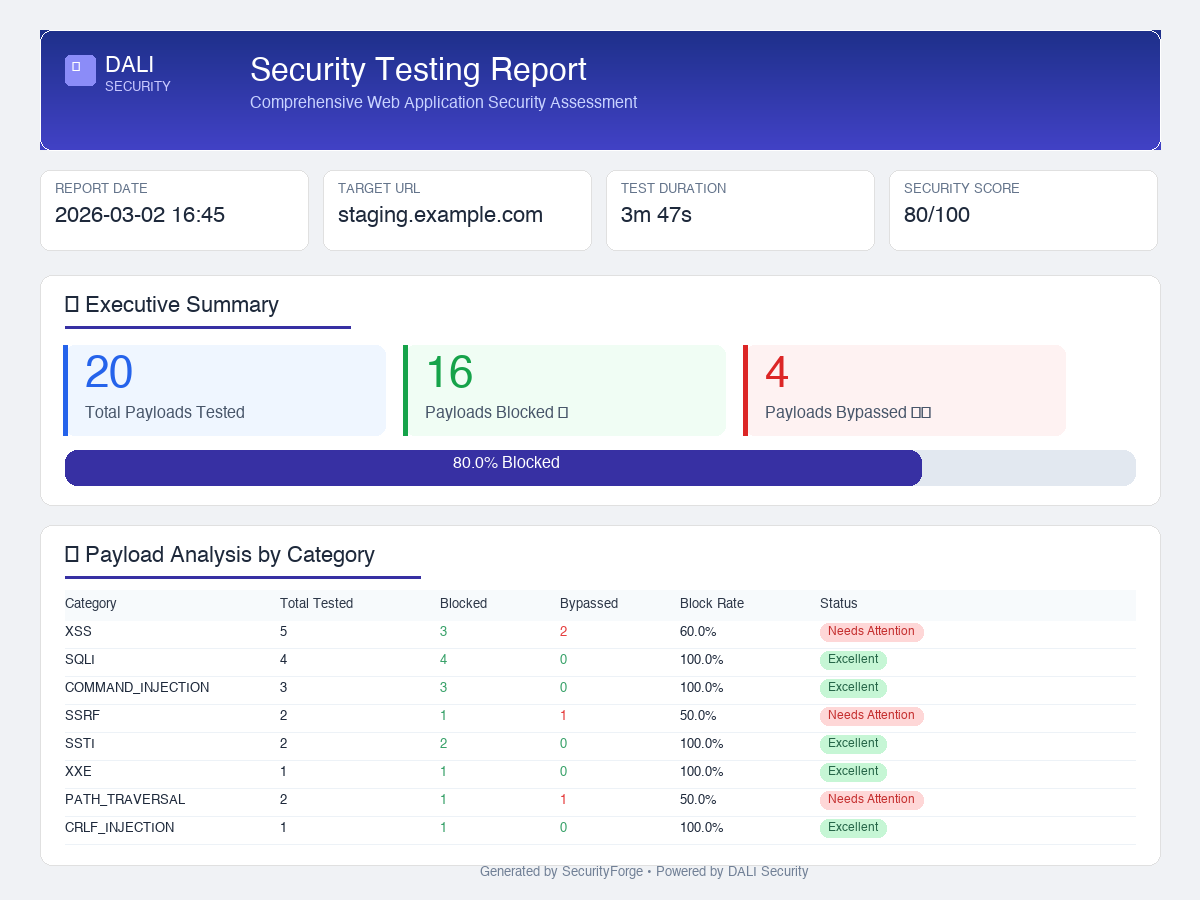
$ fray report --sample
✓ Sample report generated: sample_security_report.html
# Or generate from real scan results
$ fray report -i results.json -o report.html
MCP Server: Let AI Call Fray Directly
Fray v3.1 ships with an MCP (Model Context Protocol) server — the standard that Claude, Cursor, and other AI IDEs use to call external tools. Instead of copy-pasting payloads, your AI assistant calls Fray directly.
6 Tools Available via MCP
| Tool | What it does |
|---|---|
list_payload_categories | List all 22 payload categories with file counts |
get_payloads | Fetch payloads by category with max limit |
search_payloads | Full-text search across all payloads |
get_waf_signatures | Get WAF vendor detection signatures |
get_cve_details | Look up CVE-specific payloads and metadata |
suggest_payloads_for_waf | Get bypass payloads for a specific WAF vendor |
$ pip install fray[mcp]
# Start the MCP server
$ fray mcp
# Or add to Claude Desktop config (~/.config/claude/claude_desktop_config.json)
{
"mcpServers": {
"fray": { "command": "fray", "args": ["mcp"] }
}
}
Once configured, Claude can search payloads, look up CVEs, and suggest WAF-specific bypasses in real time — without you ever leaving your IDE.
Why Open Source? Why Free?
I could have kept this proprietary. A curated payload database with WAF detection and AI integration has real commercial value — security consulting firms would pay for it. But I'm open-sourcing it for four reasons:
The attackers already have these payloads. They share them in private Telegram channels, dark web forums, and closed bug bounty communities. The defenders are the ones who don't have access. Open-sourcing this levels the playing field.
When WAF vendors know their customers can easily test bypass techniques, they're incentivized to improve their rule sets. Fray creates a public benchmark — if your WAF can't block these payloads, the community will know.
No single person can track every new bypass technique across every WAF vendor. Open source means bug bounty hunters contribute new bypasses, researchers add published payloads, and WAF vendors can test against a standardized set.
AI assistants are increasingly used for security work. But they need structured, categorized, well-documented data to be useful. Fray is built to be AI-readable, not just human-readable.
How to Actually Use This
Scenario 1: "Is my WAF actually protecting me?"
$ pip install fray
$ fray detect https://yoursite.com
WAF Detected: AWS WAF (87% confidence)
# Step 2: Run category-specific tests
$ fray test https://yoursite.com -c xss --max 20
$ fray test https://yoursite.com -c sqli --max 20
# Step 3: View results
Results saved to fray_results.json
Scenario 2: "We just deployed a WAF — what do we test first?"
Start with the OWASP Top 10 payloads. If your WAF can't block these, nothing else matters:
- A03: Injection — Run all XSS and SQLi payloads. This is where most breaches start.
- A01: Broken Access Control — Test path traversal and SSRF payloads.
- A10: SSRF — Critical for cloud deployments. Test metadata endpoint access.
Scenario 3: "I'm doing a bug bounty and found a WAF"
- Run
fray detectto identify the vendor - Check vendor-specific bypass payloads in the database
- Try the 138 modern bypass techniques (2025–2026)
- Use encoding variations and polyglots
Scenario 4: "Test our LLM deployment for prompt injection"
Loaded 300+ payloads
Testing 20 payloads against https://your-llm-app.com
$ fray payloads
ai_prompt_injection 8 files
llm_testing 4 files
Categories: prompt injection, jailbreaks, indirect injection, data exfiltration
Custom Payloads: The Real Power
The pre-built database is just the starting point. The real power of Fray is building custom payloads for your specific environment.
Every organization's WAF configuration is different. The rules that Cloudflare applies to an e-commerce site are different from what AWS WAF applies to a financial API. Generic testing misses the gaps. Custom testing finds them.
$ python3 payload_creator.py
What do you want to test?
> XSS bypass for Cloudflare with React frontend
Generated 15 custom payloads:
1. React dangerouslySetInnerHTML exploitation
2. JSX expression injection via template literals
3. Cloudflare encoding bypass (double URL + Unicode)
4. DOM clobbering targeting React hydration
...
With AI assistants, you can go even further: describe your tech stack in plain English and let Claude or ChatGPT generate targeted payloads using Fray's database as a foundation.
We want every company — from a 2-person startup to a Fortune 500 enterprise — to be able to answer one question with confidence: “Is my WAF bulletproof, or is it security theater?”
What's Next
Fray is just getting started. Here's what we're building:
- Auto-update pipeline — new CVEs and bypass techniques added within 48 hours of disclosure
- Monthly WAF benchmark reports — public reports comparing vendor effectiveness against our payload database
- Community payload submissions — structured contribution process with automated validation
- REST API mode — integrate Fray into your CI/CD pipeline
- More AI integrations — Codex CLI, Gemini, local LLMs via Ollama
Try Fray
5,500+ payloads. 25 WAF fingerprints. Zero dependencies. Zero configuration.
Install and run in 10 seconds.
$ fray detect https://example.com
$ fray test https://example.com -c xss --max 10
# That's it. One install. No config. No API keys.